

10 Best Metaverse Crypto Projects To Watch Out For in 2023
Everyone has very little or no knowledge about the Metaverse. What does it mean and how does it work? We might not...

OPD Desk is a Windows-based desktop application designed for individual doctors to manage appointments, patient visit history, medicines given during consultations, and basic practice income and expenses from one simple workspace.
No complicated clinic management. No patient app. No notifications. Just the essential records a doctor needs to manage a day-to-day OPD practice.










A doctor's day involves more than knowing who is coming next. Patient visits need to be recorded, previous history needs to be available, medicines given during consultations need to be remembered, and everyday practice income and expenses need to stay organized.
OPD Desk brings these basic activities together in one Windows application.
The product is intentionally focused. It does not try to become a hospital management system or a patient engagement platform. It gives individual doctors a straightforward digital desk for managing their own OPD records.
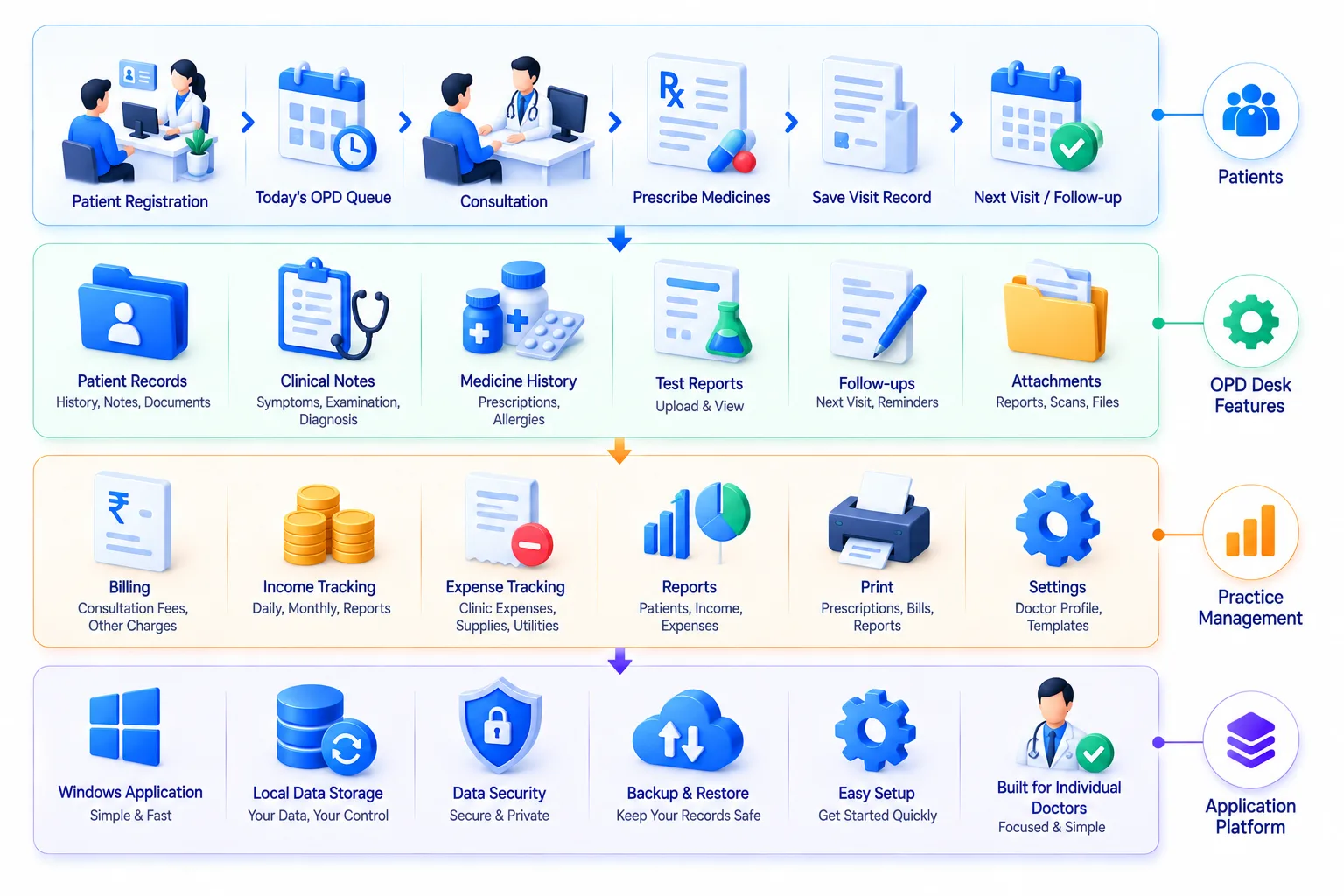
OPD Desk focuses on the records and activities an individual doctor uses most often during a normal OPD day.
OPD Desk is designed for doctors who manage their own practice and want a simple digital system without the complexity of a full hospital or multi-user clinic management platform.
Doctors running their own private OPD practice.
Small practices where the doctor manages the majority of daily operations.
Doctors who need a simple way to maintain appointment and patient visit records.
Doctors managing OPD sessions alongside other professional responsibilities.
Specialist doctors who want patient history and medication records available during repeat visits.
Doctors moving from paper registers to a basic desktop-based system.
Practitioners who want their OPD records managed through a Windows application rather than a browser or mobile application.
Create an appointment for the patient.
Find an existing patient or create a patient record.
Check previous visits and recorded medication before the consultation.
Add the relevant information from the current visit.
Add the medicines given or advised during the consultation.
The current visit becomes part of the patient's ongoing record for future consultations.
Record relevant income and expenses separately from patient records.
Repeat consultations are easier when previous records are available in one place. OPD Desk keeps a patient's appointment and visit history together so the doctor can review earlier consultations before recording the current visit.

OPD Desk also provides a basic way to maintain the financial side of an individual practice. Doctors can record their practice-related income and other expenses without maintaining a separate notebook or spreadsheet for everyday entries.

OPD Desk is designed specifically for Windows desktop use. The application is built around the doctor's workstation, keeping common OPD activities accessible without requiring multiple applications or complicated navigation.
Open and manage the day's appointments.
Search and review patient information.
Access previous visits from the patient's record.
Record and review medicines associated with visits.
Maintain income and expense entries.
Keep frequently used activities easy to reach.








Patient and practice records should be handled carefully. OPD Desk is designed with controlled access to the application and structured management of the records stored within it.
Control access to the desktop application.
Keep patient information organized within the application.
Protect historical consultation and medication records from casual access.
Keep income and expense records within the application.
Maintain patient and practice records in a structured format.
Keep appointments, visits, medication records and financial entries associated with the appropriate records.
Maintain appointments and patient records during regular OPD hours.
Quickly review previous visits and medication records.
Keep a structured history instead of relying entirely on physical registers.
Maintain a record of medicines associated with previous consultations.
Keep basic operational records for an individual medical practice.
Record everyday income and expenses related to the practice.
Move basic OPD records from notebooks and registers into a Windows desktop application.
Understand how the doctor currently manages appointments, patients and daily records.
Design a simple interface around the most frequently used activities.
Build the Windows application around the defined OPD workflow.
Create structured records for appointments, patients, visits, medications, income and expenses.
Validate the application using real-world OPD scenarios and everyday data-entry workflows.
Set up the Windows application and provide ongoing product support as required.
OPD Desk is not designed to do everything a hospital management system can do. It is designed to do a smaller set of things well for an individual doctor.

Only the essential OPD activities are brought into one application.

Designed specifically for doctors who prefer working from a Windows computer.

The workflow is based around familiar OPD activities rather than complex software modules.

Appointments, visits and medication records can be reviewed together.

Maintain basic income and expense records alongside everyday OPD management.

No patient app, automated notifications, token management or large hospital-management features.
Explore selected healthcare technology projects and product development work delivered by Web30 India. Use the existing global Case Studies component. Only add OPD Desk-specific screenshots, deployments or outcomes if verified and approved for publication.
Explore insights on healthcare software, desktop applications, digital patient records and technology for independent medical practices. Use the existing global Knowledge Hub component.
Everyone has very little or no knowledge about the Metaverse. What does it mean and how does it work? We might not...
Today, smart contracts are beneficial for companies. This in-depth guide goes into great detail about their unique...
Everyone must be aware of how important it is to have a website in order to make a mark in the IT business industry...
Welcome to the next gaming frontier, where virtual worlds collide with reality to create immersive experiences like...
DeFi is an innovative system that will fundamentally change global finance. In summary, DeFi is an open monetary sy...
Everyone has very little or no knowledge about the Metaverse. What does it mean and how does it work? We might not...
Today, smart contracts are beneficial for companies. This in-depth guide goes into great detail about their unique...
Everyone must be aware of how important it is to have a website in order to make a mark in the IT business industry...
Welcome to the next gaming frontier, where virtual worlds collide with reality to create immersive experiences like...
DeFi is an innovative system that will fundamentally change global finance. In summary, DeFi is an open monetary sy...
Everything you need to know about our enterprise blockchain engineering process, costs, security, and architectures.
Where connections are brewed, ideas percolate, and inspiration flows!
Let’s hear about your project. Drop us the details or send us a direct email
 24/7 Support